---
jupyter: python3
author: Corey T. White
image: output/ksat-output-3.png
execute:
eval: true
freeze: auto
date-modified: today
format:
html:
toc: true
code-tools: true
code-copy: true
code-fold: true
mermaid:
theme: forest
lightbox: true
---
# Clay Center, KS -- Soil-Informed Overland Flow Simulation
Overland flow simulations typically apply a uniform rainfall rate across the landscape, treating every cell as if it sheds the same fraction of precipitation as runoff. In reality, soils vary: a sandy loam absorbs far more rain than a clay, so the water that actually runs off -- the *rainfall excess* -- differs from place to place. This notebook uses USDA SSURGO soil survey data to build a spatially varying rainfall-excess surface and feeds it into the SIMWE shallow-water model, then compares the result to a naive uniform-rainfall simulation.
## Objectives
1. Import SSURGO soil properties (hydrologic groups, saturated hydraulic conductivity) from the USDA Soil Data Access service.
2. Derive a curve-number map by combining hydrologic soil groups with NLCD 2024 land cover, capturing how different soil--cover combinations partition rainfall into infiltration and runoff.
3. Design a 100-year storm whose duration matches the watershed's time of concentration, ensuring peak runoff conditions.
4. Convert SCS curve-number runoff depths into a spatially varying rainfall-excess rate (mm/hr) suitable for SIMWE.
5. Run SIMWE twice -- once with soil-informed rainfall excess and once with uniform rainfall -- and compare the resulting flow-depth patterns.
```{python}
# | label: imports
# | echo: false
import os
import subprocess
import sys
import io
import textwrap
# import numpy as np
import matplotlib.pyplot as plt
import pandas as pd
import numpy as np
import seaborn as sns
from pprint import pprint
from PIL import Image
import sqlite3
from IPython.display import IFrame
# Ask GRASS where its Python packages are.
sys.path.append(
subprocess.check_output(["grass", "--config", "python_path"], text=True).strip()
)
# Import the GRASS packages we need.
import grass.script as gs
# Import GRASS Jupyter
import grass.jupyter as gj
from grass.tools import Tools
```
---
```{python}
# | label: install_addons
# | eval: false
addons = [
"r.in.ssurgo",
"r.curvenumber",
"r.runoff",
"r.accumulate",
"r.timeofconcentration",
"r.noaa.atlas14",
"r.manning",
"r.stream.distance",
"r.stream.basins",
]
for addon in addons:
tools.g_extension(extension=addon)
```
## Study Area
Clay Center sits in the Republican River basin of north-central Kansas (39.400 N, 97.063 W), a region dominated by cultivated crops on deep loess-derived soils. Hydrologic soil groups here range from B (moderate infiltration) to D (very slow infiltration), making it a good test case for soil-informed runoff modeling. We use a GRASS mapset called `ssurgo_demo` for all imports and analysis.
```{python}
# | label: init_session
# | echo: false
# | output: false
gisdb = os.path.join(os.getenv("HOME"), "grassdata")
site = "clay-center"
mapset = "ssurgo_demo"
session = gj.init(gisdb, site, "PERMANENT")
tools = Tools(session=session)
try:
tools.g_mapset(mapset=mapset, flags="c")
except Exception as e:
print(f"{e}")
finally:
session.switch_mapset(mapset)
```
```{python}
# | label: study_area_map
# | echo: false
# | fig-cap: "Study area near Clay Center, Kansas. The elevation raster is shown over an OpenStreetMap basemap for geographic context."
from ipyleaflet import Map, Marker
region = gs.parse_command("g.region", raster="elevation", flags="pg")
study_area_map = gj.InteractiveMap(
width=720,
height=480,
use_region=True,
)
study_area_map.map.add(Marker(location=(39.4003765, -97.0630433), title="Clay Center"))
study_area_map.map.center = (39.4003765, -97.0630433)
study_area_map.map.zoom = 11
study_area_map.add_raster("elevation", title="Elevation (m)")
study_area_map.add_vector("soil_areas_sda", title="SSURGO Soil Polygons")
study_area_map.show()
```
---
### Computational Region
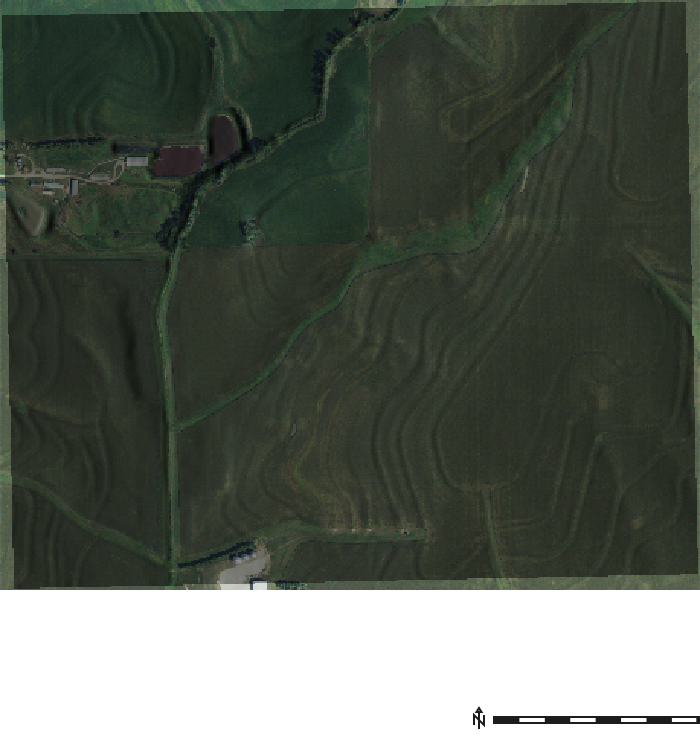
We align the computational region to the 3 m elevation raster and create a hillshade for cartographic context beneath the soil and runoff maps that follow.
```{python}
# | label: set_region
# | echo: false
region = gs.parse_command("g.region", raster="elevation", flags="pg")
labels = {
"n": "North", "s": "South", "e": "East", "w": "West",
"nsres": "N-S Resolution", "ewres": "E-W Resolution",
"rows": "Rows", "cols": "Columns", "cells": "Total Cells",
}
region_df = pd.DataFrame(
[(labels.get(k, k), f"{float(v):,.1f}" if "." in v else f"{int(v):,}")
for k, v in region.items() if k in labels],
columns=["Parameter", "Value"],
)
display(
region_df.style
.hide(axis="index")
.set_caption("Computational Region")
)
```
```{python}
# | label: create_relief
tools.r_relief(input="elevation", output="relief")
```
```{python}
# | label: study_area_detail
# | echo: false
# | fig-cap: "Detailed view of the study area showing NAIP 2021 aerial imagery draped over a hillshade with the SSURGO soil polygon boundaries."
with gs.RegionManager(raster="elevation", s="s-300", flags="a"):
m = gj.Map(use_region=True, width=700)
m.d_shade(shade="relief", color="naip_2021_rgb@naip")
# m.d_vect(
# map="soil_areas_sda",
# color="#7b6a1e",
# fillcolor="none",
# width=1,
# )
m.d_barscale(
at=(67, 5),
font="Fira Sans Condensed Light",
fontsize=12,
length=500,
unit="meters",
width_scale=1,
bgcolor="none",
color="#1c1c1c",
flags="n",
)
m.show()
```
## Importing SSURGO Soil Data
The first step toward spatially varying rainfall excess is obtaining soil properties. The USDA SSURGO database maps soil polygons (map-unit keys, or MUKEYs) and assigns each polygon laboratory-measured properties including hydrologic soil group (A through D) and saturated hydraulic conductivity (Ksat). We pull these directly from the Soil Data Access (SDA) web service using `r.in.ssurgo`, which rasterizes the polygons to match our computational region.
```{python}
# | label: import_ssurgo_sda
# | eval: false
tools.r_in_ssurgo(
soils="soil_areas_sda",
hydgrp="hydgrp_sda",
ksat_l="ksat_l_sda",
ksat_r="ksat_r_sda",
ksat_h="ksat_h_sda",
mukey="mukey_sda",
hzdept_r=0,
hzdepb_r=100,
desgnmaster="A",
nprocs=30
)
```
## Visualize Imported Data
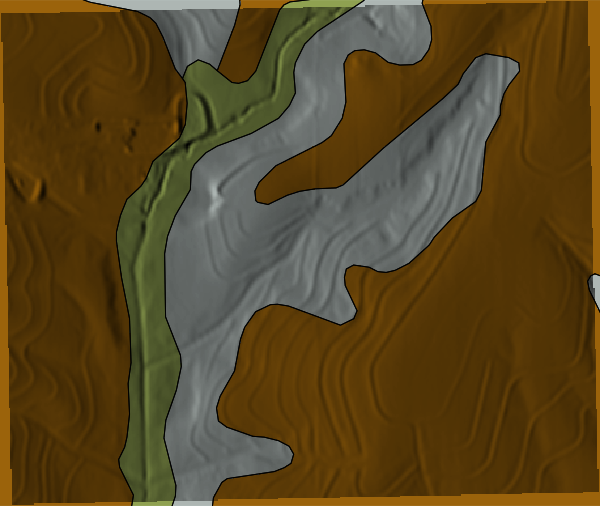
Before modeling, it is worth inspecting the imported layers to confirm spatial coverage and to build intuition about the soil landscape. The vector map `soil_areas_sda` carries the original SSURGO polygon attributes, while the rasterized layers (MUKEY, Ksat, hydrologic group) are what we use in subsequent calculations.
```{python}
# | label: SDA-soil-attributes
# | echo: false
json_data = tools.v_db_select(map="soil_areas_sda", format="json").json
df = pd.DataFrame(json_data["records"])
display(df.head())
```
### MUKEY Map
```{python}
# | label: mukey
# | echo: false
m = gj.Map(use_region=True)
m.d_shade(shade="relief", color="mukey_sda")
m.d_vect(map="soil_areas_sda", color="black", fillcolor="none", width=0.5)
# m.d_legend(raster="mukey", title="MUKEY", flags="b")
m.show()
```
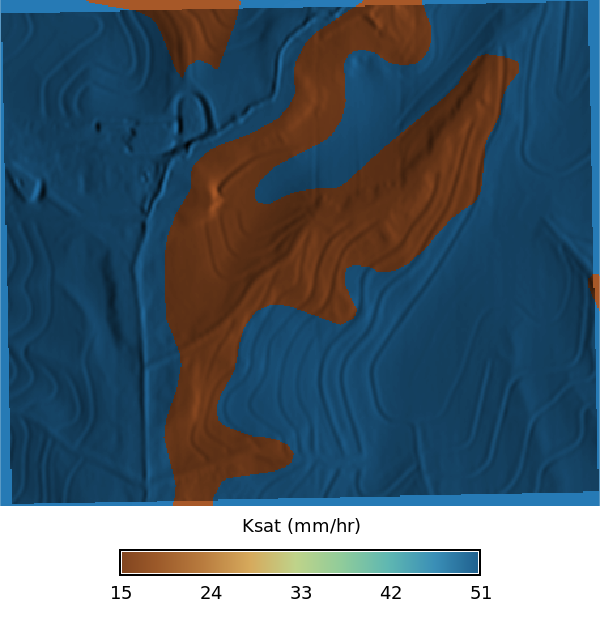
### Ksat Maps
```{python}
# | label: ksat
# | layout-ncol: 3
# | echo: false
# | fig-cap: "Ksat maps for low, regular, and high values"
# | fig-subcap:
# | - Low
# | - Regular
# | - High
def ksat_color_scheme() -> None:
"""Apply ksat color scheme to elevation map."""
gs.verbose(_("Applying ksat color scheme..."))
ksat_color_palette = [
# Very low Ksat (clays, compacted soils)
("0%", "#3B1F0E"), # very slow infiltration
("10%", "#5A2D1A"),
("20%", "#7A3F1D"),
# Low–moderate Ksat
("30%", "#9C5A2A"),
("40%", "#B97C3F"),
# Transitional (loams)
("50%", "#D6A95C"),
# Moderate–high Ksat
("60%", "#BFD38A"),
("70%", "#8FCB9B"),
# High Ksat (sands)
("80%", "#5FB7B2"),
("90%", "#3A8FB7"),
# Very high Ksat (gravel / macroporous)
("100%", "#1E5E8C"),
]
# Convert palette list to rules string for r_colors
ksat_color_scheme = (
"\n".join(f"{pos} {color}" for pos, color in ksat_color_palette) + "\n"
)
return ksat_color_scheme
from io import StringIO
with gs.RegionManager(raster="ksat_l_sda", s="s-275", flags="a"):
tools.r_colors(
map=["ksat_l_sda", "ksat_r_sda", "ksat_h_sda"],
rules=StringIO(ksat_color_scheme()),
)
m = gj.Map(use_region=True, width=600)
m.d_shade(shade="relief", color="ksat_l_sda", brighten=30)
m.d_legend(
raster="ksat_l_sda",
title="Ksat (mm/hr)",
at="8, 12, 20, 80",
)
m.show()
m = gj.Map(use_region=True, width=600)
m.d_shade(shade="relief", color="ksat_r_sda", brighten=30)
m.d_legend(
raster="ksat_r_sda",
title="Ksat (mm/hr)",
at="8, 12, 20, 80",
)
m.show()
m = gj.Map(use_region=True, width=600)
m.d_shade(shade="relief", color="ksat_h_sda", brighten=30)
m.d_legend(
raster="ksat_h_sda",
title="Ksat (mm/hr)",
at="8, 12, 20, 80",
)
m.show()
```
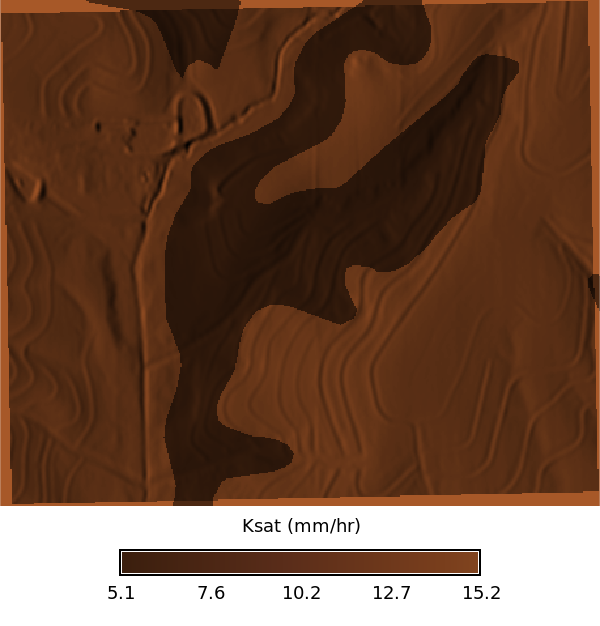
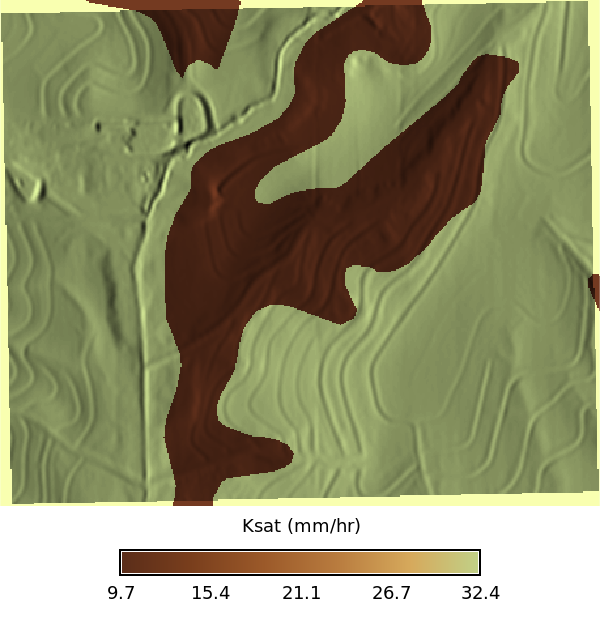
Ksat (saturated hydraulic conductivity) describes how quickly water moves through saturated soil. Higher values (blues) indicate coarser, more permeable soils; lower values (browns) indicate finer, less permeable soils. Although Ksat could be used directly as an infiltration input to SIMWE via the `infil` parameter, in this notebook we instead use the SCS curve-number method to account for infiltration. The curve-number approach integrates soil group, land cover, and antecedent moisture into a single runoff-depth estimate, which is better suited to event-based design-storm analysis. We retain the Ksat maps here for reference and potential future use with continuous-simulation approaches.
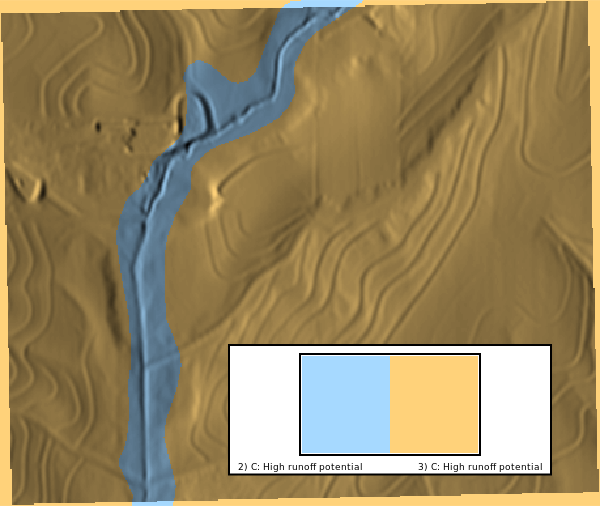
### Hydrologic Soil Group
Hydrologic soil group is the key link between SSURGO data and the curve-number method. The USDA classifies soils into four groups based on their minimum infiltration rate: **A** (sand/gravel, high infiltration), **B** (moderate), **C** (slow), and **D** (clay, very slow). Dual-class soils like A/D behave as A when drained and D when undrained. The spatial pattern of these groups directly controls where runoff is generated in the curve-number calculation that follows.
```{python}
# | label: hydrologic_group_map
# | layout-ncol: 1
# | echo: false
# | fig-cap: "Hydrologic groups"
with gs.RegionManager(raster="hydgrp_sda", s="s-300", flags="a"):
m = gj.Map(use_region=True, width=600)
m.d_shade(shade="relief", color="hydgrp_sda")
m.d_legend(
raster="hydgrp_sda",
flags="cbn",
at="2,12,5,15",
title="Hydrologic Group",
)
m.d_barscale(
at=(67, 5),
font="Fira Sans Condensed Light",
fontsize=12,
length=250,
unit="meters",
width_scale=1,
bgcolor="none",
color="#4f4e4e",
flags="n",
)
m.show()
```
## From Soils to Runoff: The Curve Number
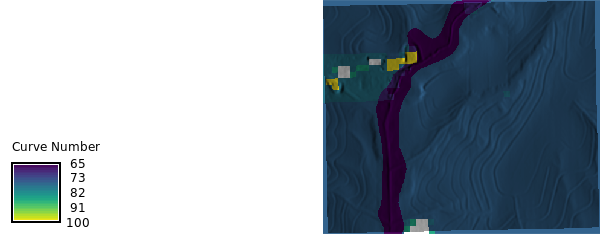
The SCS curve number (CN) translates the combination of soil group and land cover into a single index (0--100) that predicts how much rainfall becomes runoff. A high CN (e.g., 90 for impervious surfaces on group-D soil) means most rain runs off; a low CN (e.g., 30 for forest on group-A soil) means most rain infiltrates. By computing CN for every cell, we capture the spatial heterogeneity that a uniform-rainfall assumption ignores.
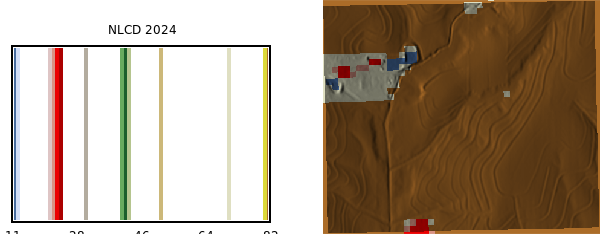
To calculate the curve number, we need both a land cover map and a hydrologic soil group map. The land cover map is from the National Land Cover Database (NLCD) 2024 dataset, which was imported as a COG raster.
```{python}
# | label: import_landcover
# | eval: false
tools.r_import(
output="nlcd_2024",
input="/home/coreywhite/Downloads/Annual_NLCD_LndCov_2024_CU_C1V1.cog.tif",
extent="region",
resolution="region",
)
```
NLCD 2024 land cover map:
```{python}
# | label: landcover_map
# | layout-ncol: 1
# | echo: false
# | fig-cap: "Land cover map derived from the NLCD 2024 dataset."
# | fig-subcap:
# | - Land Cover
with gs.RegionManager(raster="nlcd_2024", w="w-1200", flags="a"):
tools.r_category(
map="nlcd_2024",
separator="|",
rules=io.StringIO(
"11|Open Water\n"
"12|Perennial Ice/Snow\n"
"21|Developed, Open Space\n"
"22|Developed, Low Intensity\n"
"23|Developed, Medium Intensity\n"
"24|Developed, High Intensity\n"
"31|Barren Land\n"
"41|Deciduous Forest\n"
"42|Evergreen Forest\n"
"43|Mixed Forest\n"
"52|Shrub/Scrub\n"
"71|Grassland/Herbaceous\n"
"81|Pasture/Hay\n"
"82|Cultivated Crops\n"
"90|Woody Wetlands\n"
"95|Emergent Herbaceous Wetlands\n"
),
)
m = gj.Map(use_region=True)
m.d_shade(shade="relief", color="nlcd_2024")
m.d_legend(
raster="nlcd_2024",
font="Fira Sans Condensed Light",
flags="n",
at="5,85,2,20",
fontsize=14,
)
m.show()
```
The `r.curvenumber` extension cross-references each cell's NLCD land-cover class with its hydrologic soil group using standard NRCS lookup tables (TR-55).
```{python}
# | label: curvenumber_calc
tools.r_curvenumber(
landcover="nlcd_2024",
soil="hydgrp_sda",
landcover_source="nlcd",
output="curvenumber",
)
```
```{python}
# | label: curvenumber_map
# | layout-ncol: 1
# | echo: false
# | fig-cap: "Curve number map derived from the NLCD 2024 dataset and hydrologic soil group map."
# | fig-subcap:
# | - Curve Number
with gs.RegionManager(raster="curvenumber", s="s-275", flags="a"):
m = gj.Map(use_region=True)
m.d_shade(shade="relief", color="curvenumber")
m.d_legend(
raster="curvenumber",
title="Curve Number",
flags="",
at="8, 12, 20, 80",
fontsize=12,
)
m.show()
```
The CN map shows higher values over cultivated cropland on group-C/D soils and lower values where grassland overlies group-B soils. Next, we need the watershed's time of concentration to select an appropriate design-storm duration.
## Watershed Delineation and Time of Concentration
To design a realistic storm event we need the watershed's *time of concentration* (Tc) -- the time it takes water to travel from the hydraulically most distant point to the outlet. When storm duration equals Tc, the entire watershed contributes runoff simultaneously, producing the peak discharge that engineering design must accommodate.
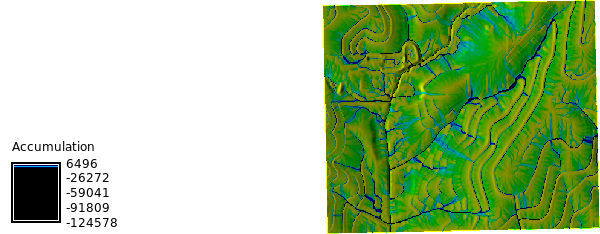
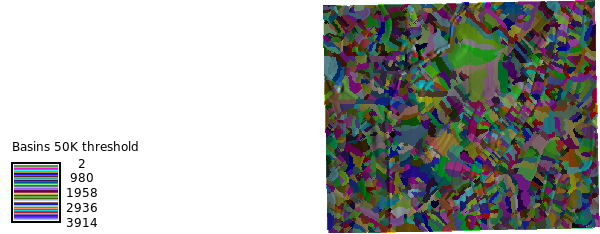
We first derive flow direction, streams, and sub-basins with `r.watershed`, then compute Tc with `r.timeofconcentration`.
```{python}
#| label: watershed
tools.r_watershed(
elevation="elevation",
drainage="flow_direction",
accumulation="accumulation",
stream="stream",
basin="basins",
threshold=1000,
)
```
```{python}
# | label: watershed_map
# | layout-ncol: 2
# | echo: false
# | fig-cap: "Flow accumulation and basins derived from the elevation raster using r.watershed with a 1000 cell threshold."
# | fig-subcap:
# | - Flow Accumulation
# | - Basins (1000 cell threshold)
with gs.RegionManager(raster="accumulation", s="s-275", flags="a"):
univar_stats = tools.r_univar(map="accumulation", format="json").json
m = gj.Map(use_region=True)
m.d_shade(shade="relief", color="accumulation")
m.d_legend(
raster="accumulation",
title="Cell Count",
at="8, 12, 20, 80",
range=f"0, {univar_stats['max']}",
flags="s",
)
m.show()
m2 = gj.Map(use_region=True)
m2.d_shade(shade="relief", color="basins")
m2.show()
```
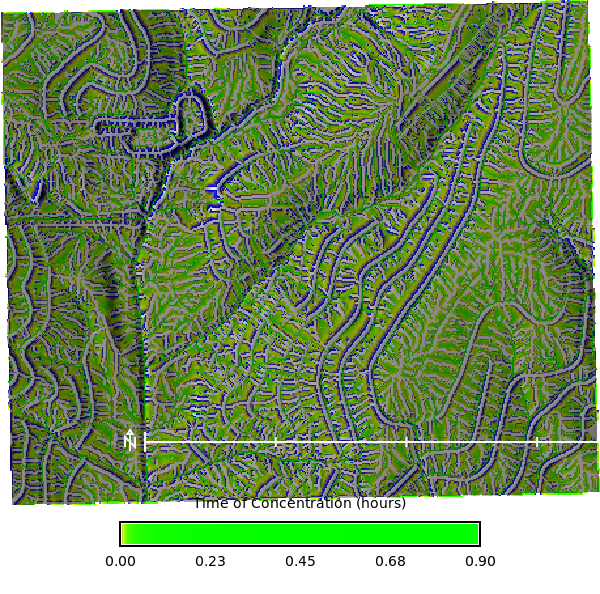
With flow direction and streams defined, we compute Tc for each cell using `r.timeofconcentration`. The result is a raster of travel times (in hours) from each cell to the nearest stream channel.
```{python}
# | label: time_of_concentration
tools.r_timeofconcentration(
elevation="elevation",
direction="flow_direction",
stream="stream",
length_min=100, # minimum length of flow path
tc="time_concentration",
)
```
```{python}
# | label: time_of_concentration_map
# | fig-cap: "Time of concentration derived from the elevation raster using r.timeofconcentration."
# | fig-subcap:
# | - Time of Concentration
with gs.RegionManager(raster="elevation", s="s-250", flags="a"):
tools.r_colors(map="time_concentration", color="byg", flags="e")
m = gj.Map(use_region=True, width=600)
m.d_shade(shade="relief", color="time_concentration")
m.d_legend(
raster="time_concentration",
at="8, 12, 20, 80",
title="Time of Concentration (hours)",
font="Fira Sans Condensed Light",
fontsize=14,
flags="s",
)
m.d_barscale(
at=(68, 28),
font="Fira Sans Condensed Light",
fontsize=10,
length=250,
unit="meters",
width_scale=1,
bgcolor="none",
# style="both_ticks",
color="#1c1c1c",
flags="n",
)
m.show()
```
Summary statistics for the Tc raster show the range of travel times across the watershed. The maximum Tc determines the design-storm duration.
```{python}
# | label: time_of_concentration_stats
# | echo: false
tc_json = tools.r_univar(map="time_concentration", flags="e", format="json").json
df_tc = pd.DataFrame(tc_json)
tc_table = (
pd.DataFrame(tc_json, index=[0])
.T.reset_index()
.rename(columns={"index": "Statistic", 0: "Value"})
)
percentiles_row = tc_table.loc[tc_table["Statistic"] == "percentiles", "Value"]
tc_table = tc_table.loc[tc_table["Statistic"] != "percentiles"].copy()
if not percentiles_row.empty:
p = percentiles_row.iloc[0]
if isinstance(p, dict):
pct_df = pd.DataFrame(
[{"Statistic": f"percentile_{k}", "Value": v} for k, v in p.items()]
)
tc_table = pd.concat([tc_table, pct_df], ignore_index=True)
display(
tc_table.style.hide(axis="index")
.set_caption("Time of Concentration — Summary Statistics")
.format(
{
"Value": lambda v: f"{v:,.3f}"
if isinstance(v, (int, float, np.number))
else v
}
)
)
```
The maximum Tc across the watershed sets our design-storm duration. We now query NOAA Atlas 14 to find the rainfall intensity for a storm of that duration.
## Designing the Storm: NOAA Atlas 14
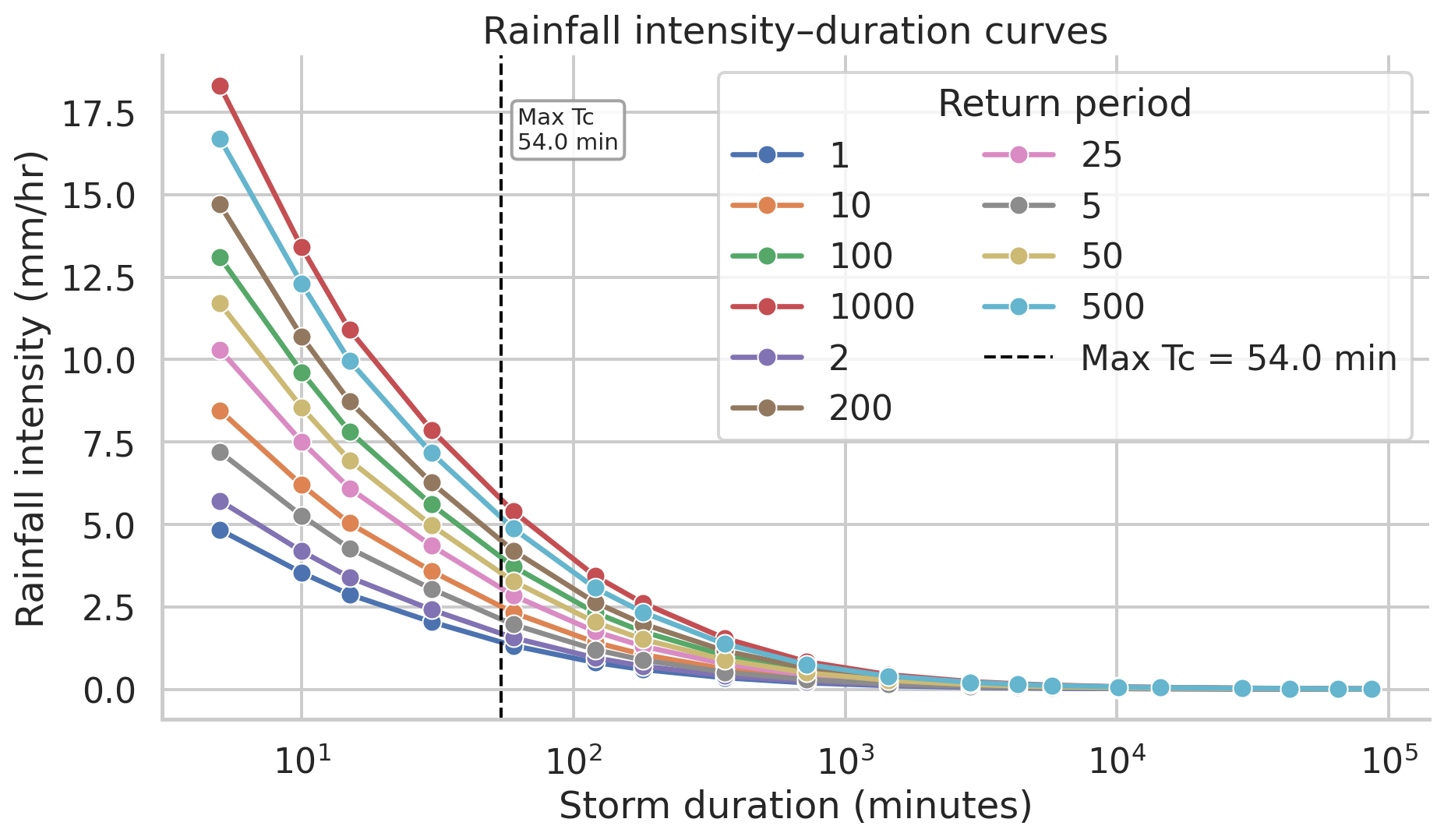
A design storm must answer two questions: *how intense?* and *for how long?* We have already determined the duration (equal to the watershed's maximum Tc). For the intensity, we use NOAA Atlas 14 precipitation-frequency estimates, which provide rainfall intensity--duration--frequency (IDF) curves for any point in the US. We extract the 100-year return-period intensity at the Tc duration -- representing a severe but plausible event -- to drive our simulation.
```{python}
# | label: noaa-percip-freq
# | echo: false
pfds_csv = tools.r_noaa_atlas14(
mode="point",
statistic="intensity",
vector_output="noaa_atlas14_station",
coordinates=[-97.0630433, 39.4003765],
unit="english",
series="pds",
bound="expected",
format="csv",
).text
```
With the 100-year intensity at the Tc duration in hand, we compute total rainfall depth (intensity x duration) and create a uniform precipitation raster. This total depth is what the SCS curve-number equation needs to partition rainfall into infiltration and runoff.
```{python}
# | label: tc_and_rfi
df_tc_min = df_tc[["min", "mean", "max"]].apply(
lambda x: round(x * 60, 2)
) # convert to minutes
max_tc = df_tc_min["max"].max()
print(max_tc)
df_rf_intensity = pd.read_csv(io.StringIO(pfds_csv))
display(
df_rf_intensity.style.hide(axis="index")
.set_caption("Rainfall Intensity — NOAA Atlas 14, Clay Center, NC")
.format(
{
"Value": lambda v: f"{v:,.3f}"
if isinstance(v, (int, float, np.number))
else v
}
)
)
```
```{python}
# | label: rainfall_intensity_figure
# | echo: false
# | fig-cap: "NOAA Atlas 14 rainfall intensity by storm duration for Coweeta, NC, with the maximum time of concentration marked."
rf = df_rf_intensity.copy()
duration_col = next(
(c for c in rf.columns if "duration" in c.lower()),
rf.columns[0],
)
def _duration_to_minutes(value):
text = str(value).strip().lower()
match = re.search(r"(\d+(?:\.\d+)?)", text)
if not match:
return np.nan
number = float(match.group(1))
if "day" in text:
return number * 24 * 60
if "hr" in text or "hour" in text:
return number * 60
return number
import re
rf["duration_min"] = rf[duration_col].apply(_duration_to_minutes)
value_cols = [c for c in rf.columns if c not in {duration_col, "duration_min"}]
rf_long = rf.melt(
id_vars=["duration_min"],
value_vars=value_cols,
var_name="return_period",
value_name="intensity_mm_hr",
)
rf_long["intensity_mm_hr"] = pd.to_numeric(rf_long["intensity_mm_hr"], errors="coerce")
rf_long = rf_long.dropna(subset=["duration_min", "intensity_mm_hr"]).sort_values(
["return_period", "duration_min"]
)
sns.set_theme(style="whitegrid", context="talk")
fig, ax = plt.subplots(figsize=(10, 6))
sns.lineplot(
data=rf_long,
x="duration_min",
y="intensity_mm_hr",
hue="return_period",
marker="o",
linewidth=2.5,
ax=ax,
)
ax.axvline(
max_tc,
color="black",
linestyle="--",
linewidth=1.5,
label=f"Max Tc = {max_tc:.1f} min",
)
ax.annotate(
f"Max Tc\n{max_tc:.1f} min",
xy=(max_tc, rf_long["intensity_mm_hr"].max()),
xytext=(8, -10),
textcoords="offset points",
ha="left",
va="top",
fontsize=11,
bbox=dict(boxstyle="round,pad=0.25", fc="white", ec="0.6", alpha=0.9),
)
ax.set_xscale("log")
ax.set_xlabel("Storm duration (minutes)")
ax.set_ylabel("Rainfall intensity (mm/hr)")
ax.set_title("Rainfall intensity–duration curves")
ax.legend(title="Return period", frameon=True, ncol=2)
sns.despine()
plt.tight_layout()
plt.show()
return_periods = rf_long["return_period"].dropna().unique()
rp_100 = next(
(
rp
for rp in return_periods
if re.search(r"100", str(rp)) and re.search(r"(yr|year)", str(rp).lower())
),
next((rp for rp in return_periods if re.search(r"100", str(rp))), None),
)
if rp_100 is None:
raise ValueError("Could not identify the 100-year storm column in rainfall intensity data.")
rf_100 = (
rf_long.loc[rf_long["return_period"] == rp_100, ["duration_min", "intensity_mm_hr"]]
.dropna()
.sort_values("duration_min")
)
storm_intensity_100yr = float(
np.interp(
np.log10(max_tc),
np.log10(rf_100["duration_min"].to_numpy()),
rf_100["intensity_mm_hr"].to_numpy(),
)
)
rain_inches_per_hour = storm_intensity_100yr
display(
pd.DataFrame(
{
"return_period": [rp_100],
"max_tc_min": [round(max_tc, 2)],
"intensity_in_hr": [round(storm_intensity_100yr, 2)],
}
).style.hide(axis="index").set_caption(
"Interpolated rainfall intensity at maximum time of concentration"
)
)
print(f"100-year storm intensity at max Tc ({max_tc:.2f} min): {storm_intensity_100yr:.2f} in/hr")
```
```{python}
# | label: precipitation_mm
duration_min = round(max_tc, 2)
intensity_in_hr =rain_inches_per_hour
intensity_mm_hr = intensity_in_hr * 25.4
duration_hr = duration_min / 60.0
rain_mm = intensity_mm_hr * duration_hr
print(f"Storm duration: {duration_min:.4f} min")
print(f"Storm duration: {duration_hr:.4f} hr")
print(f"Rainfall intensity: {intensity_in_hr:.3f} in/hr")
print(f"Rainfall intensity: {intensity_mm_hr:.3f} mm/hr")
print(f"Rain depth: {rain_mm:.3f} mm")
tools.r_mapcalc(
expression=f"rain = {rain_mm}", # mm of precipitation
)
```
```{python}
# | label: runoff_calculation
# Make sure you have the following GRASS addons installed
# - r.accumulate
# - r.runoff
tools.r_runoff(
rainfall="rain",
direction="flow_direction",
duration=duration_hr, # hours
curvenumber="curvenumber",
time_concentration="time_concentration",
runoff_depth="runoff_depth",
runoff_volume="runoff_volume",
upstream_area="upstream_area",
upstream_runoff_depth="upstream_runoff_depth",
upstream_runoff_volume="upstream_runoff_volume",
time_to_peak="time_to_peak",
peak_discharge="peak_discharge",
)
```
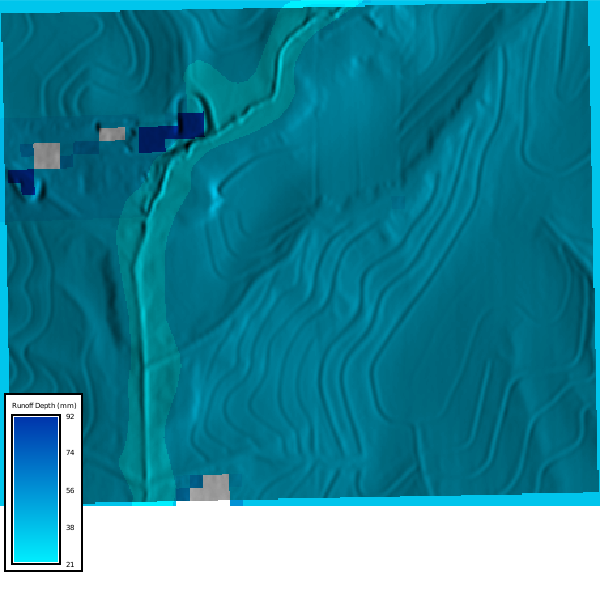
The runoff depth map shows how much water (mm) runs off each cell after accounting for soil infiltration via the curve number. This is the spatially varying quantity we will convert to rainfall excess for SIMWE.
```{python}
# | label: runoff_map
# | layout-ncol: 1
# | echo: false
# | fig-cap: "Runoff Depth Map."
# | fig-subcap:
# | - Derived runoff depth (mm)
with gs.RegionManager(raster="runoff_depth", s="s-275", flags="a"):
m = gj.Map(use_region=True)
tools.r_colors(map="runoff_depth", color="water")
m.d_shade(shade="relief", color="runoff_depth")
m.d_legend(
raster="runoff_depth",
title="Runoff Depth (mm)",
flags="",
at="8, 12, 20, 80",
fontsize=12,
)
m.show()
```
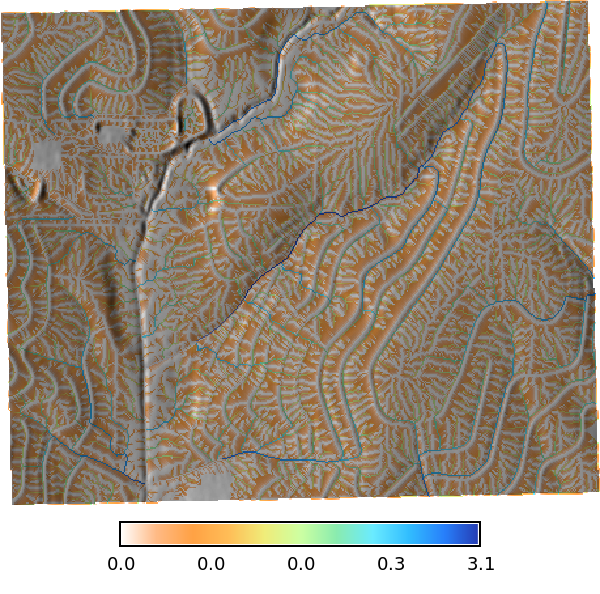
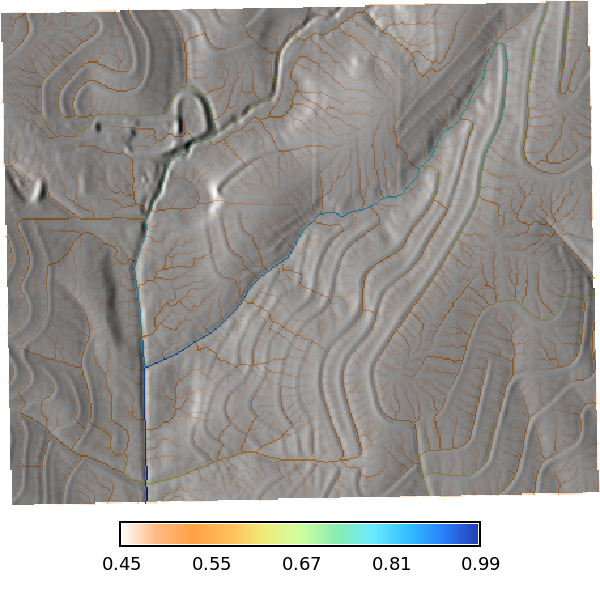
The `r.runoff` tool also produces peak discharge (m^3^/s) and time-to-peak (hours) rasters, which characterize the hydrologic response at each point in the watershed.
```{python}
# | label: peak_discharge_map
# | echo: false
# | layout-ncol: 2
# | fig-cap: Discharge
# | fig-subcap:
# | - Peak Discharge (m³/s)
# | - Time to Peak (hours)
with gs.RegionManager(raster="peak_discharge", s="s-200", flags="a"):
tools.r_colors(map="peak_discharge", color="haxby", flags="gn")
m = gj.Map(use_region=True)
m.d_shade(shade="relief", color="peak_discharge")
m.d_legend(
raster="peak_discharge",
at="8, 12, 20, 80",
# title="Peak Discharge (m³/s)",
flags="l",
)
m.show()
tools.r_colors(map="time_to_peak", color="haxby", flags="gn")
m1 = gj.Map(use_region=True)
m1.d_shade(shade="relief", color="time_to_peak")
m1.d_legend(
raster="time_to_peak",
at="8, 12, 20, 80",
# title="Time to Peak (hours)",
flags="l",
)
m1.show()
```
## Overland Flow Simulation (SIMWE)
SIMWE (`r.sim.water`) solves the shallow-water equations using a path-sampling method. It requires two spatially distributed inputs: a rainfall rate for each cell (the `rain` parameter, in mm/hr) and a surface-roughness coefficient (Manning's n). We prepare both below.
### Surface Roughness: Manning's n
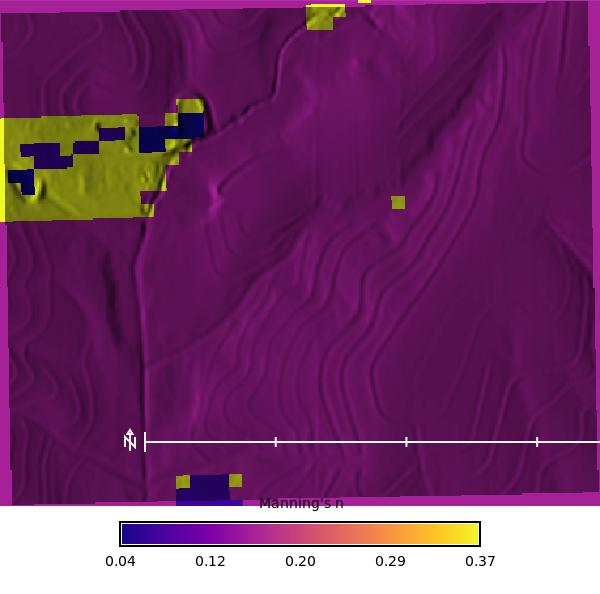
We derive Manning's n from the NLCD 2024 land-cover map using the lookup table from Kalyanapu et al. (2009), which assigns higher roughness to forested and wetland areas and lower values to developed and barren surfaces.
```{python}
# | label: mannings_n
tools.r_manning(
input="nlcd_2024",
output="mannings_n",
landcover="nlcd",
source="kalyanapu",
seed=42,
)
```
```{python}
# | label: r_manning_map
# | echo: false
# | layout-ncol: 1
# | fig-cap: Manning's n map derived from the NLCD 2024 land cover map using the r.manning tool with the Kalyanapu et al. (2009) lookup table.
# | fig-subcap:
# | - Manning's n
mannings_n_colors = io.StringIO(
"0.008 #F0E68C\n" # Barren Land (low end)
"0.025 #6BAED6\n" # Open Water
"0.040 #A1D99B\n" # Developed, Open Space / Open Water (med)
"0.068 #BDBDBD\n" # Developed, Low/Med Intensity
"0.160 #F4A460\n" # Cultivated Crops
"0.183 #66C2A4\n" # Emergent Herbaceous Wetlands
"0.325 #D4B86A\n" # Pasture/Hay
"0.368 #A8C25C\n" # Grassland/Herbaceous
"0.400 #2D8C2D\n" # Mixed Forest / Shrub
"0.530 #1A5C1A\n" # Dense Forest (high end)
)
with gs.RegionManager(raster="mannings_n", s="s-250", flags="a"):
tools.r_colors(map="mannings_n", rules=mannings_n_colors)
m = gj.Map(use_region=True, width=600)
m.d_shade(shade="relief", color="mannings_n")
m.d_legend(
raster="mannings_n",
at="8, 12, 20, 80",
title="Manning's n",
font="Fira Sans Condensed Light",
fontsize=16,
flags="s",
)
m.d_barscale(
at=(67, 25),
font="Fira Sans Condensed Light",
fontsize=12,
length=250,
unit="meters",
width_scale=1,
bgcolor="none",
# style="both_ticks",
color="#ffffff",
flags="n",
)
m.show()
```
### Converting Runoff Depth to Rainfall Excess
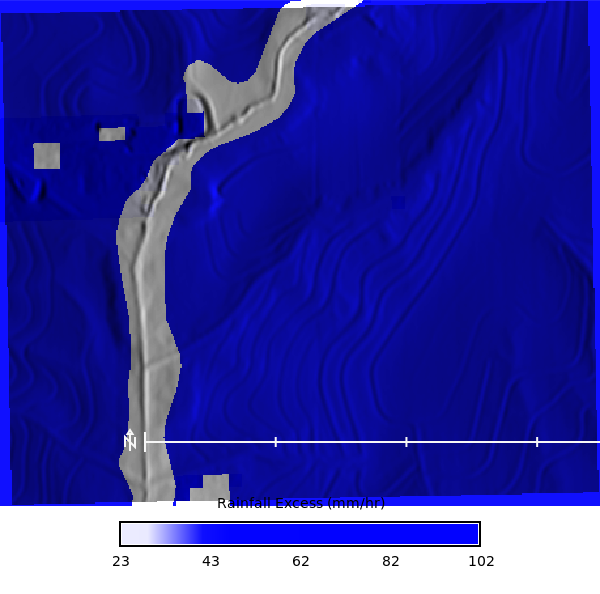
The SCS curve-number method gives us **runoff depth** (mm) -- the total depth of water that runs off each cell over the entire storm. SIMWE, however, needs an instantaneous **rainfall-excess rate** (mm/hr). To convert:
$$\text{rainfall excess (mm/hr)} = \frac{\text{runoff depth (mm)}}{\text{storm duration (hr)}}$$
Our design storm lasts for the watershed Tc of approximately 54 minutes (54/60 = 0.9 hours). Dividing the per-cell runoff depth by 0.9 hours yields the average rainfall-excess rate over the storm. This spatially varying raster replaces the uniform `rain_value` in the soil-informed simulation.
```{python}
# | label: rainfall_excess_calc
tools.r_mapcalc(
expression=f"rainfall_excess = runoff_depth / 0.9",
)
```
```{python}
# | label: rainfall_excess_map
with gs.RegionManager(raster="rainfall_excess", s="s-250", flags="a"):
tools.r_colors(map="rainfall_excess", color="water", flags="e")
m = gj.Map(use_region=True, width=600)
m.d_shade(shade="relief", color="rainfall_excess")
m.d_legend(
raster="rainfall_excess",
at="8, 12, 20, 80",
title="Rainfall Excess (mm/hr)",
font="Fira Sans Condensed Light",
fontsize=16,
flags="s",
)
m.d_barscale(
at=(67, 25),
font="Fira Sans Condensed Light",
fontsize=12,
length=250,
unit="meters",
width_scale=1,
bgcolor="none",
# style="both_ticks",
color="#ffffff",
flags="n",
)
m.show()
```
### Simulation A: Soil-Informed Rainfall Excess
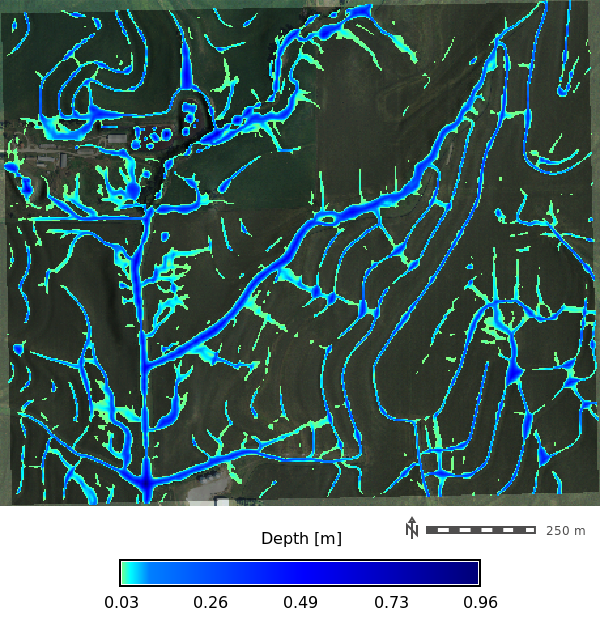
We now run SIMWE for the full 54-minute design storm using the spatially varying `rainfall_excess` raster. Each cell receives only the rainfall that its soil--cover combination cannot absorb, so areas with high curve numbers (clay soils, cropland) generate more runoff than areas with low curve numbers (grassland on loamy soil). Manning's n from NLCD controls surface roughness.
Note: the `infil` parameter (Ksat-based infiltration of flowing water) is available but intentionally left disabled. We have already accounted for infiltration through the curve-number rainfall excess. Enabling `infil` would double-count infiltration losses.
```{python}
# | label: r_sim_water
# | eval: false
# 100yr storm running for 54.05 min with soil informed
# Rainfall excess
duration_min = 54.05 ## Hardcoded for now, but could be derived from the Tc raster
tools.r_slope_aspect(elevation="elevation", dx="dx", dy="dy")
tools.r_sim_water(
elevation="elevation",
depth="rx_100yr_depth",
discharge="rx_100yr_discharge",
walkers_output="rx_100yr_walkers",
rain="rainfall_excess", # Infiltration / Veg Intercept
man="mannings_n", # Mixed forest Kalyanapu et al. (2009)
nwalkers=1000000,
# infil="ksat_r_sda", # Infiltration of flowing water
# niterations=1440 / 2,
duration=duration_min, # Duration of the simulated water flow [minutes]
output_step=2, # Time interval for creating output maps [minutes]
nprocs=30,
flags="t",
)
# Register the output maps into a space time dataset
gs.run_command(
"t.create",
output="rx_100yr_depth_sum",
type="strds",
temporaltype="absolute",
title="Runoff Depth",
description="Runoff Depth in [m]",
overwrite=True,
)
# Get the list of depth maps
depth_list = gs.read_command(
"g.list", type="raster", pattern="rx_100yr_depth.*", separator="comma"
).strip()
# Register the maps
gs.run_command(
"t.register",
input="rx_100yr_depth_sum",
type="raster",
start="2024-01-01",
increment="2 minutes",
maps=depth_list,
flags="i",
overwrite=True,
)
```
```{python}
# | label: rx_100yr_depth_map
# | eval: true
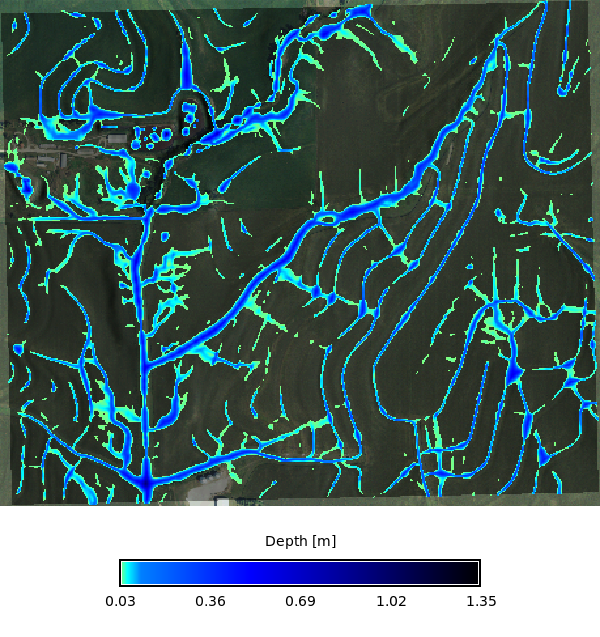
# | fig-cap: "Runoff depth map derived from the r.sim.water tool for a 100-year storm with soil data, visualized at the last outputed time step."
depth_list = gs.read_command(
"g.list", type="raster", pattern="rx_100yr_depth.*", separator="comma"
).strip()
max_depth = depth_list.split(",")[-1]
stats = tools.r_info(map=max_depth, format="json").json
def parse_simwe_comments(comments: str) -> pd.DataFrame:
params = {}
for line in comments.strip().splitlines():
for part in line.split(","):
part = part.strip()
if "=" in part:
k, v = part.split("=", 1)
k = k.strip()
v = v.strip().strip('"')
try:
v = float(v) if "." in v or "e" in v.lower() else int(v)
except ValueError:
pass
params[k] = v
return (
pd.DataFrame(list(params.items()), columns=["Parameter", "Value"])
)
display(
parse_simwe_comments(stats["comments"])
.style.hide(axis="index")
.set_caption(f"r.sim.water run summary — {max_depth}")
)
with gs.RegionManager(raster="accumulation", s="s-300", flags="a"):
m = gj.Map(use_region=True, width=600)
m.d_shade(shade="relief", color="naip_2021_rgb@naip")
m.d_rast(map=max_depth, values=f"0.025-{stats['max']}")
m.d_legend(
raster=max_depth,
at="8, 12, 20, 80",
title="Depth [m]",
font="Fira Sans Condensed Light",
range=[0.025, stats["max"]],
fontsize=16,
flags="s",
)
m.d_barscale(
at=(67, 19),
font="Fira Sans Condensed Light",
fontsize=12,
length=250,
unit="meters",
width_scale=1,
bgcolor="none",
# style="both_ticks",
color="#4f4e4e",
flags="n",
)
m.show()
```
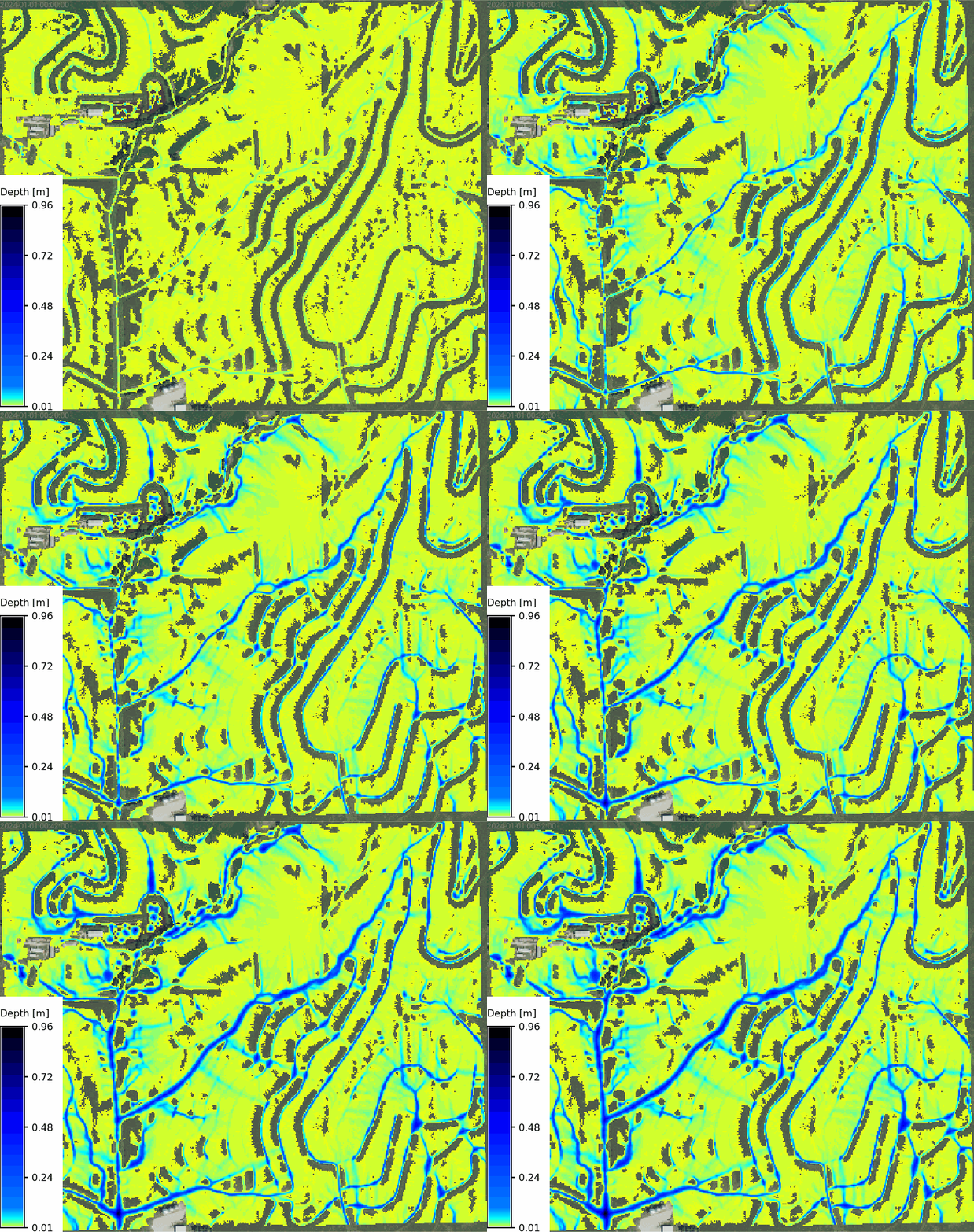
The animation below shows flow depth evolving over the 54-minute storm. Runoff concentrates in the drainage channels, with depth patterns reflecting the upstream soil and land-cover mosaic encoded in the rainfall-excess raster.
```{python}
# | label: tc_100_depth_map
# | eval: false
max_depth = depth_list.split(",")[-1]
stats = tools.r_info(map=max_depth, format="json").json
with gs.RegionManager(raster="accumulation", s="s-300", flags="a"):
m = gj.TimeSeriesMap(use_region=True, width=600)
m.d_rast(map="naip_2021_rgb@naip")
m.add_raster_series("rx_100yr_depth_sum", values=f"0.005-{stats['max']}")
m.d_legend(
raster=max_depth,
title="Depth [m]",
flags="bt",
border_color="none",
range=[0.005, stats["max"]],
at="8, 12, 20, 80",
)
m.d_barscale(
at=(67, 19),
font="Fira Sans Condensed Light",
fontsize=12,
length=250,
unit="meters",
width_scale=1,
bgcolor="none",
color="#4f4e4e",
flags="n",
)
m.save("output/clay_center_rx_100yr_simwe_depth_animation.gif")
m.show()
```
### Simulation B: Uniform Rainfall (No Soil Correction)
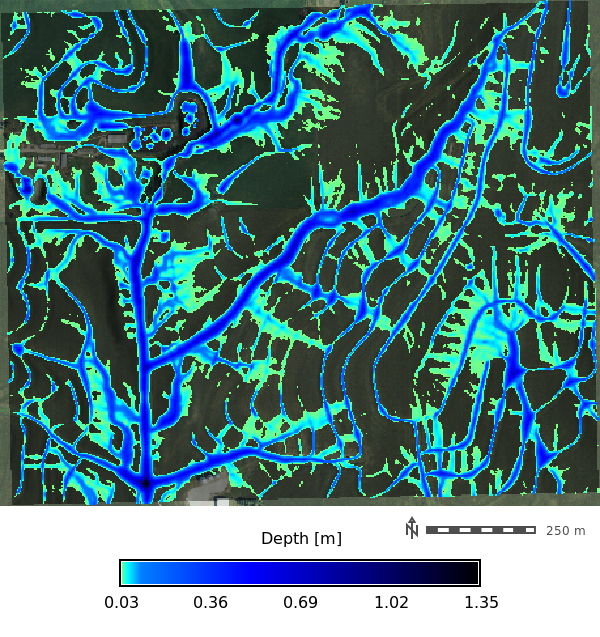
For comparison, we run the same storm as a uniform rainfall rate applied equally to every cell -- the approach one would take without soil data. Here `rain_value` is set to the full 100-year intensity (approximately 102 mm/hr) with no curve-number reduction. Every cell generates runoff as if its soil were impervious, so we expect uniformly higher flow depths and no spatial differentiation driven by soil properties.
```{python}
# | label: r_sim_water_no_soil
# | eval: false
intensity_mm_hr = 101.937 # 100-year storm intensity at max Tc (54.05 min) from NOAA Atlas 14
duration_min = 54.05 ## Hardcoded for now, but could be derived from the Tc raster
tools.r_sim_water(
elevation="elevation",
depth="basic_depth",
discharge="basic_disch",
walkers_output="basic_particles",
rain_value=intensity_mm_hr, # Rainfall intensity: 95.584 mm/hr
man="mannings_n", # Mixed forest Kalyanapu et al. (2009)
nwalkers=1000000,
# infil="ksat_r_sda", # Infiltration of flowing water
niterations=duration_min,
output_step=2,
nprocs=0,
flags="t",
)
gs.run_command(
"t.create",
output="basic_depth_sum",
type="strds",
temporaltype="absolute",
title="Runoff Depth",
description="Runoff Depth in [m]",
overwrite=True,
)
# Get the list of depth maps
depth_list = gs.read_command(
"g.list", type="raster", pattern="basic_depth.*", separator="comma"
).strip()
# Register the maps
gs.run_command(
"t.register",
input="basic_depth_sum",
type="raster",
start="2024-01-01",
increment="2 minutes",
maps=depth_list,
flags="i",
overwrite=True,
)
```
```{python}
# | label: basic_depth_map
# | eval: true
depth_list = gs.read_command(
"g.list", type="raster", pattern="basic_depth.*", separator="comma"
).strip()
basic_max_depth = depth_list.split(",")[-1]
stats = tools.r_info(map=basic_max_depth, format="json").json
with gs.RegionManager(raster="accumulation", s="s-300", flags="a"):
m = gj.Map(use_region=True, width=600)
m.d_shade(shade="relief", color="naip_2021_rgb@naip")
m.d_rast(map=basic_max_depth, values=f"0.025-{stats['max']}")
m.d_legend(
raster=basic_max_depth,
at="8, 12, 20, 80",
title="Depth [m]",
font="Fira Sans Condensed Light",
range=[0.025, stats["max"]],
fontsize=16,
flags="s",
)
m.d_barscale(
at=(67, 19),
font="Fira Sans Condensed Light",
fontsize=12,
length=250,
unit="meters",
width_scale=1,
bgcolor="none",
# style="both_ticks",
color="#4f4e4e",
flags="n",
)
m.show()
```
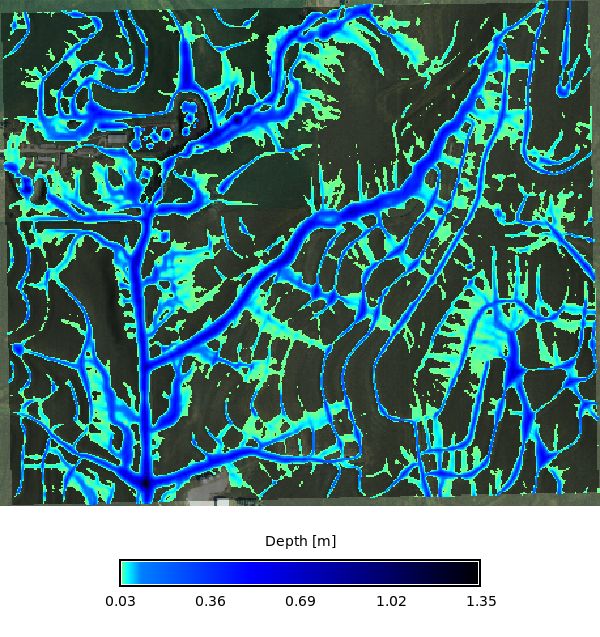
The uniform-rainfall animation shows noticeably deeper flow everywhere compared to the soil-informed run. Without soil-based partitioning, the model treats the entire landscape as equally impervious, overestimating runoff from permeable soils and losing the spatial heterogeneity visible in the soil-informed results.
```{python}
# | label: basic_depth_map_animation
# | eval: false
basic_max_depth = depth_list.split(",")[-1]
stats = tools.r_info(map=basic_max_depth, format="json").json
with gs.RegionManager(raster="accumulation", s="s-300", flags="a"):
m = gj.TimeSeriesMap(use_region=True, width=600)
m.d_rast(map="naip_2021_rgb@naip")
m.add_raster_series("basic_depth_sum", values=f"0.005-{stats['max']}")
m.d_legend(
raster=basic_max_depth,
title="Depth [m]",
flags="bt",
border_color="none",
range=[0.005, stats["max"]],
at="8, 12, 20, 80",
)
m.d_barscale(
at=(67, 19),
font="Fira Sans Condensed Light",
fontsize=12,
length=250,
unit="meters",
width_scale=1,
bgcolor="none",
# style="both_ticks",
color="#4f4e4e",
flags="n",
)
m.save("output/clay_center_basic_depth_simwe_depth_animation.gif")
m.show()
```
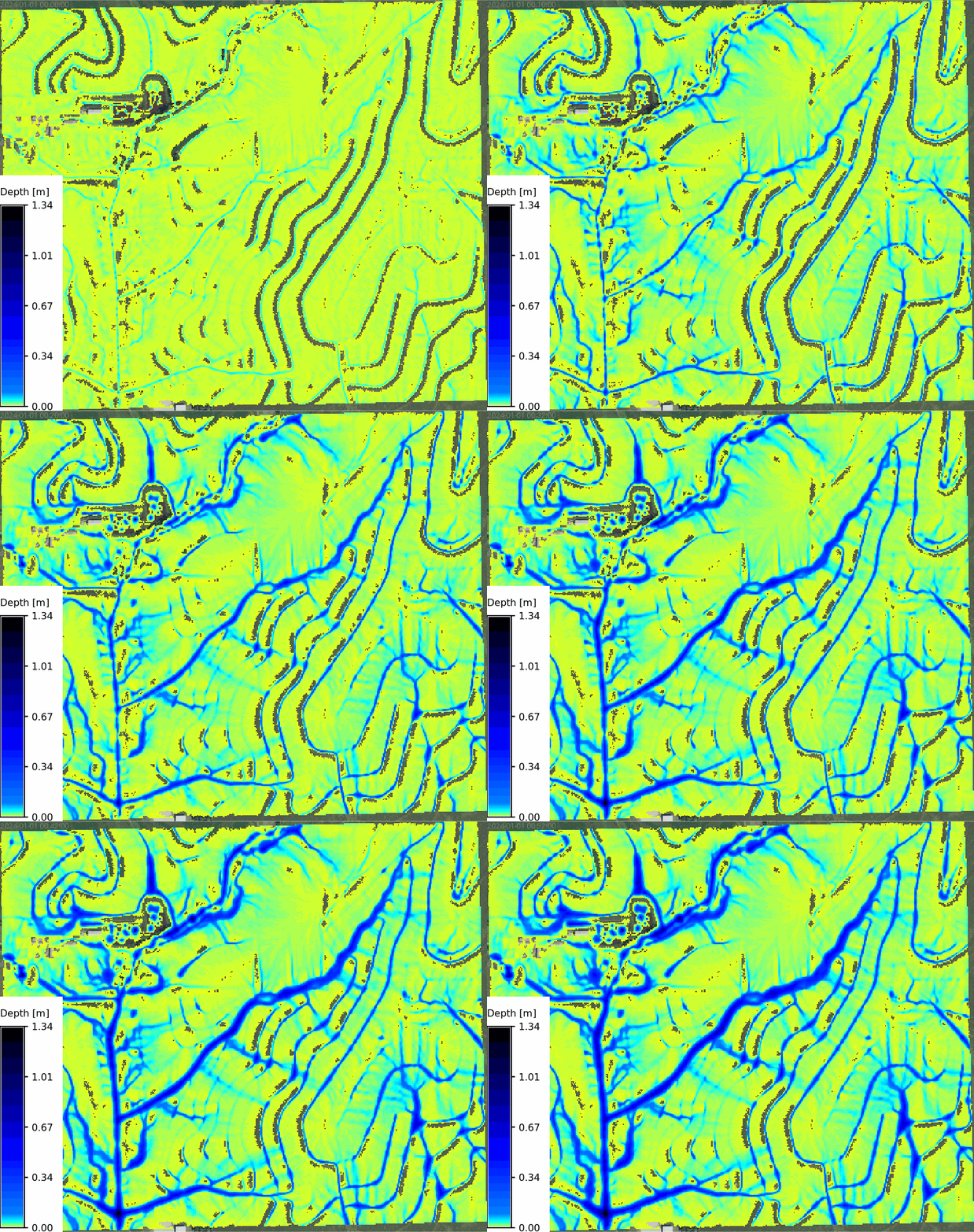
### Comparing the Two Simulations
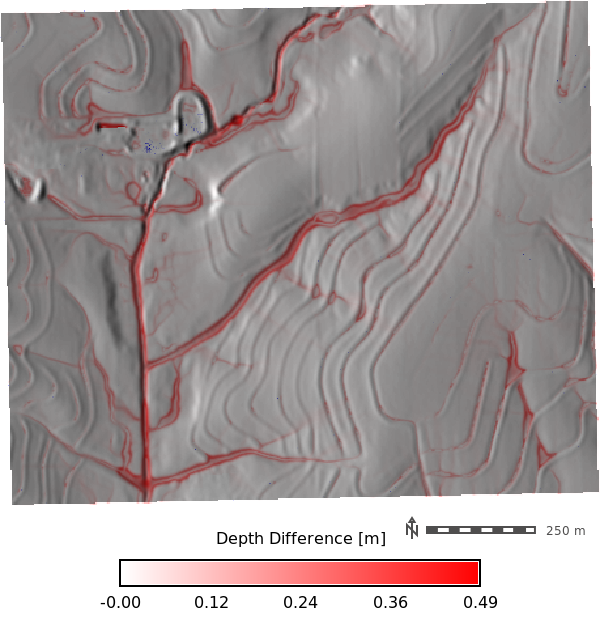
To quantify the effect of soil-informed rainfall excess, we compare the final-timestep depth rasters from both runs. The difference map (uniform minus soil-informed) highlights where and by how much the uniform assumption overestimates water depth.
```{python}
# | label: comparison_difference_map
# | echo: false
# | fig-cap: "Difference in simulated flow depth (uniform rainfall minus soil-informed rainfall excess) at the final time step. Positive values (blue) indicate locations where the uniform assumption overestimates depth."
rx_depth_list = gs.read_command(
"g.list", type="raster", pattern="rx_100yr_depth.*", separator="comma"
).strip()
basic_depth_list = gs.read_command(
"g.list", type="raster", pattern="basic_depth.*", separator="comma"
).strip()
rx_max = rx_depth_list.split(",")[-1]
basic_max = basic_depth_list.split(",")[-1]
tools.r_mapcalc(
expression=f"depth_difference = {basic_max} - {rx_max}",
)
with gs.RegionManager(raster="depth_difference", s="s-300", flags="a"):
tools.r_colors(map="depth_difference", color="differences")
m = gj.Map(use_region=True, width=600)
m.d_shade(shade="relief", color="depth_difference")
m.d_legend(
raster="depth_difference",
at="8, 12, 20, 80",
title="Depth Difference [m]",
font="Fira Sans Condensed Light",
fontsize=16,
flags="s",
)
m.d_barscale(
at=(67, 19),
font="Fira Sans Condensed Light",
fontsize=12,
length=250,
unit="meters",
width_scale=1,
bgcolor="none",
color="#4f4e4e",
flags="n",
)
m.show()
```
Side-by-side comparison of the final-timestep flow depth for both simulations, displayed on the same color scale for direct visual comparison.
```{python}
# | label: comparison_side_by_side
# | echo: false
# | layout-ncol: 2
# | fig-cap: "Final-timestep flow depth comparison using a shared color scale."
# | fig-subcap:
# | - "Soil-Informed Rainfall Excess"
# | - "Uniform Rainfall"
rx_stats = tools.r_info(map=rx_max, format="json").json
basic_stats = tools.r_info(map=basic_max, format="json").json
shared_max = max(float(rx_stats["max"]), float(basic_stats["max"]))
with gs.RegionManager(raster="accumulation", s="s-300", flags="a"):
tools.r_colors(
map=[basic_max, rx_max],
raster=basic_max,
flags="",
)
m1 = gj.Map(use_region=True, width=600)
m1.d_shade(shade="relief", color="naip_2021_rgb@naip")
m1.d_rast(map=rx_max, values=f"0.025-{shared_max}")
m1.d_legend(
raster=rx_max,
at="8, 12, 20, 80",
title="Depth [m]",
font="Fira Sans Condensed Light",
range=[0.025, shared_max],
fontsize=14,
flags="s",
)
m1.show()
m2 = gj.Map(use_region=True, width=600)
m2.d_shade(shade="relief", color="naip_2021_rgb@naip")
m2.d_rast(map=basic_max, values=f"0.025-{shared_max}")
m2.d_legend(
raster=basic_max,
at="8, 12, 20, 80",
title="Depth [m]",
font="Fira Sans Condensed Light",
range=[0.025, shared_max],
fontsize=14,
flags="s",
)
m2.show()
```
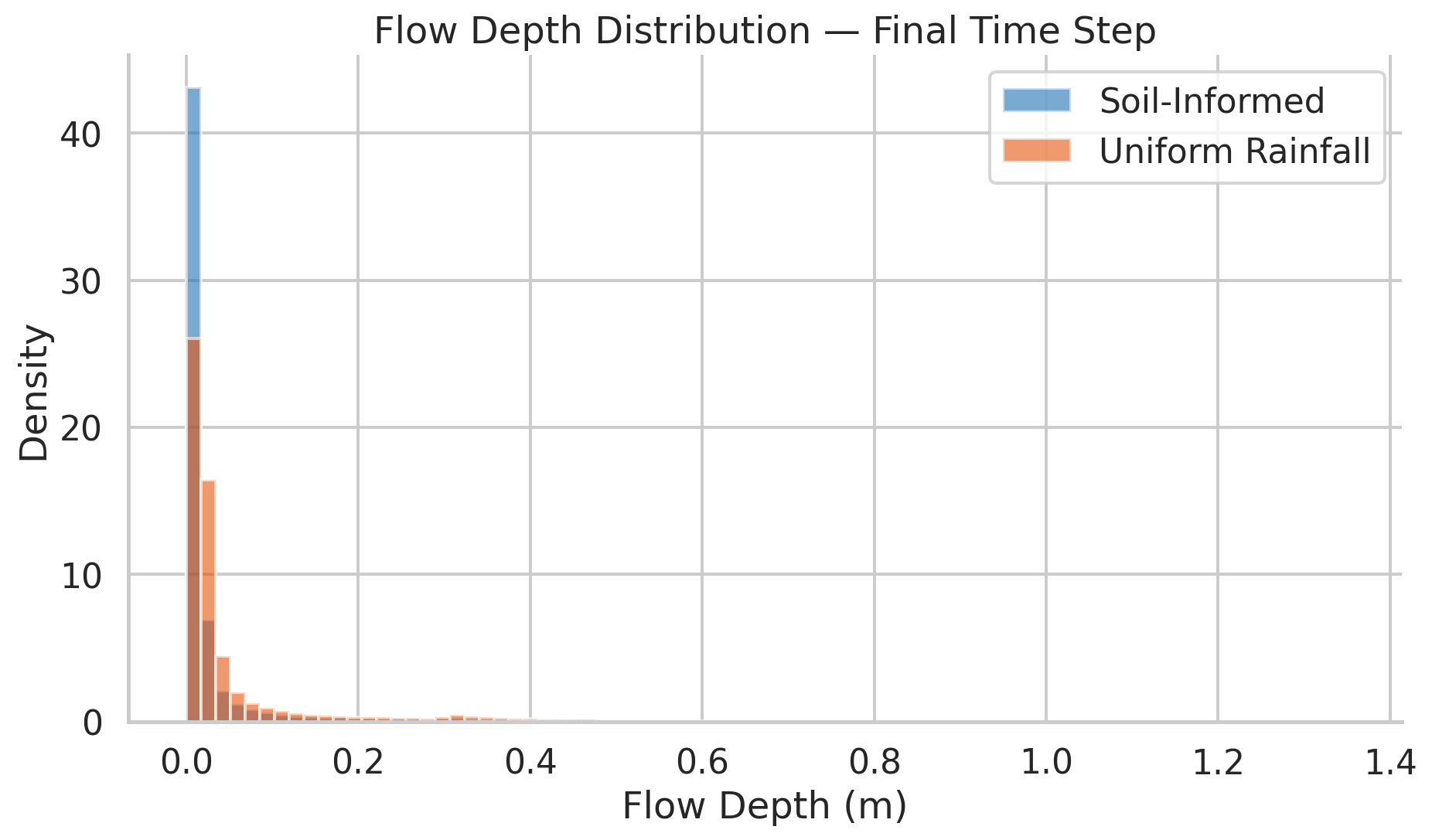
Summary statistics for both simulations and the difference raster, showing how uniform rainfall systematically overestimates flow depth.
```{python}
# | label: comparison_statistics
# | echo: false
rx_univar = tools.r_univar(map=rx_max, flags="e", format="json").json
basic_univar = tools.r_univar(map=basic_max, flags="e", format="json").json
diff_univar = tools.r_univar(map="depth_difference", flags="e", format="json").json
stats_df = pd.DataFrame(
{
"Statistic": ["Mean", "Std Dev", "Min", "Max", "Median"],
"Soil-Informed (m)": [
rx_univar["mean"],
rx_univar["stddev"],
rx_univar["min"],
rx_univar["max"],
rx_univar["median"],
],
"Uniform Rainfall (m)": [
basic_univar["mean"],
basic_univar["stddev"],
basic_univar["min"],
basic_univar["max"],
basic_univar["median"],
],
"Difference (m)": [
diff_univar["mean"],
diff_univar["stddev"],
diff_univar["min"],
diff_univar["max"],
diff_univar["median"],
],
}
)
display(
stats_df.style.hide(axis="index")
.set_caption("Flow Depth Summary Statistics — Final Time Step")
.format(
{
"Soil-Informed (m)": "{:.4f}",
"Uniform Rainfall (m)": "{:.4f}",
"Difference (m)": "{:.4f}",
}
)
)
```
```{python}
# | label: comparison_histogram
# | echo: false
# | fig-cap: "Distribution of flow depth at the final time step for both simulations. The uniform-rainfall run (orange) is shifted toward higher depths relative to the soil-informed run (blue)."
fig, ax = plt.subplots(figsize=(10, 6))
rx_data = gs.read_command("r.stats", input=rx_max, flags="1n", separator="newline")
basic_data = gs.read_command("r.stats", input=basic_max, flags="1n", separator="newline")
rx_vals = np.array([float(v) for v in rx_data.strip().splitlines() if float(v) > 0.001])
basic_vals = np.array([float(v) for v in basic_data.strip().splitlines() if float(v) > 0.001])
shared_bins = np.linspace(0, max(rx_vals.max(), basic_vals.max()), 80)
ax.hist(rx_vals, bins=shared_bins, alpha=0.6, label="Soil-Informed", color="#2171b5", density=True)
ax.hist(basic_vals, bins=shared_bins, alpha=0.6, label="Uniform Rainfall", color="#e6550d", density=True)
ax.set_xlabel("Flow Depth (m)")
ax.set_ylabel("Density")
ax.set_title("Flow Depth Distribution — Final Time Step")
ax.legend()
sns.despine()
plt.tight_layout()
plt.show()
```
## Discussion and Conclusions
The comparison above quantifies the practical value of soil-informed rainfall excess:
- **Spatial pattern.** The difference map shows that the uniform-rainfall assumption does not simply scale depths up everywhere -- it shifts the spatial distribution of runoff. The soil-informed run produces heterogeneous flow depths that reflect the underlying soil--cover mosaic, with channels draining clay-rich cropland carrying more water than those draining grassland on loamier soils. The uniform run loses this differentiation.
- **Magnitude.** The summary statistics and histogram confirm that uniform rainfall systematically overestimates flow depth. In areas with group-B soils and low curve numbers, the overestimate is largest because those cells absorb a substantial fraction of rainfall that the uniform model ignores entirely.
- **Implications for management.** Accurate runoff prediction matters for conservation planning, infrastructure sizing, and flood-risk assessment. Using freely available SSURGO data to spatially distribute rainfall excess is a low-cost improvement over uniform assumptions, especially in agricultural watersheds where soil variability is high.
### Limitations and Next Steps
- The SCS curve-number method assumes a single antecedent moisture condition (AMC II). Wet or dry antecedent conditions would shift CN values and change runoff depths.
- Ksat-based continuous infiltration (via the SIMWE `infil` parameter) could complement or replace the event-based CN approach for longer or multi-event simulations.
- Comparing discharge (not just depth) between the two runs would further quantify the hydrologic impact of soil data on peak flow predictions.
## GRASS Addons
This notebook relies on several GRASS addon modules that extend the core functionality with soil data import, hydrologic modeling, and land-cover parameterization tools. Install them from the [GRASS Addons repository](https://github.com/OSGeo/grass-addons) using `g.extension`.
| Addon | Description | Role in this notebook |
|---|---|---|
| [r.in.ssurgo](https://grass.osgeo.org/grass-devel/manuals/addons/r.in.ssurgo.html) | Import SSURGO soil data from SDA or local files | Imports hydrologic groups, Ksat, and soil polygons |
| [r.curvenumber](https://grass.osgeo.org/grass-devel/manuals/addons/r.curvenumber.html) | SCS curve number from soil group and land cover | Produces the CN raster used to partition rainfall |
| [r.runoff](https://grass.osgeo.org/grass-devel/manuals/addons/r.runoff.html) | SCS-CN runoff depth and peak discharge | Converts rainfall + CN into spatially varying runoff depth |
| [r.accumulate](https://grass.osgeo.org/grass-devel/manuals/addons/r.accumulate.html) | Flow accumulation (dependency of r.runoff) | Traces flow paths for runoff routing |
| [r.timeofconcentration](https://grass.osgeo.org/grass-devel/manuals/addons/r.timeofconcentration.html) | Watershed time of concentration | Determines design-storm duration |
| [r.noaa.atlas14](https://grass.osgeo.org/grass-devel/manuals/addons/r.noaa.atlas14.html) | NOAA Atlas 14 precipitation frequency data | Provides IDF curves for the 100-year storm |
| [r.manning](https://grass.osgeo.org/grass-devel/manuals/addons/r.manning.html) | Manning's n from land cover | Creates the surface-roughness input for SIMWE |
| [r.stream.distance](https://grass.osgeo.org/grass-devel/manuals/addons/r.stream.distance.html) | Distance to and elevation above streams | Stream proximity analysis for Tc computation |
| [r.stream.basins](https://grass.osgeo.org/grass-devel/manuals/addons/r.stream.basins.html) | Delineate basins from a stream network | Sub-basin delineation for hydrologic analysis |